Order management for land surveying.
Built for firms that survey for builders. Every order, every lot, every status change, from the first call to the invoice that closes it.
In daily production at surveying firms since 2006. Hosted, maintained, and supported by The Plug Group.
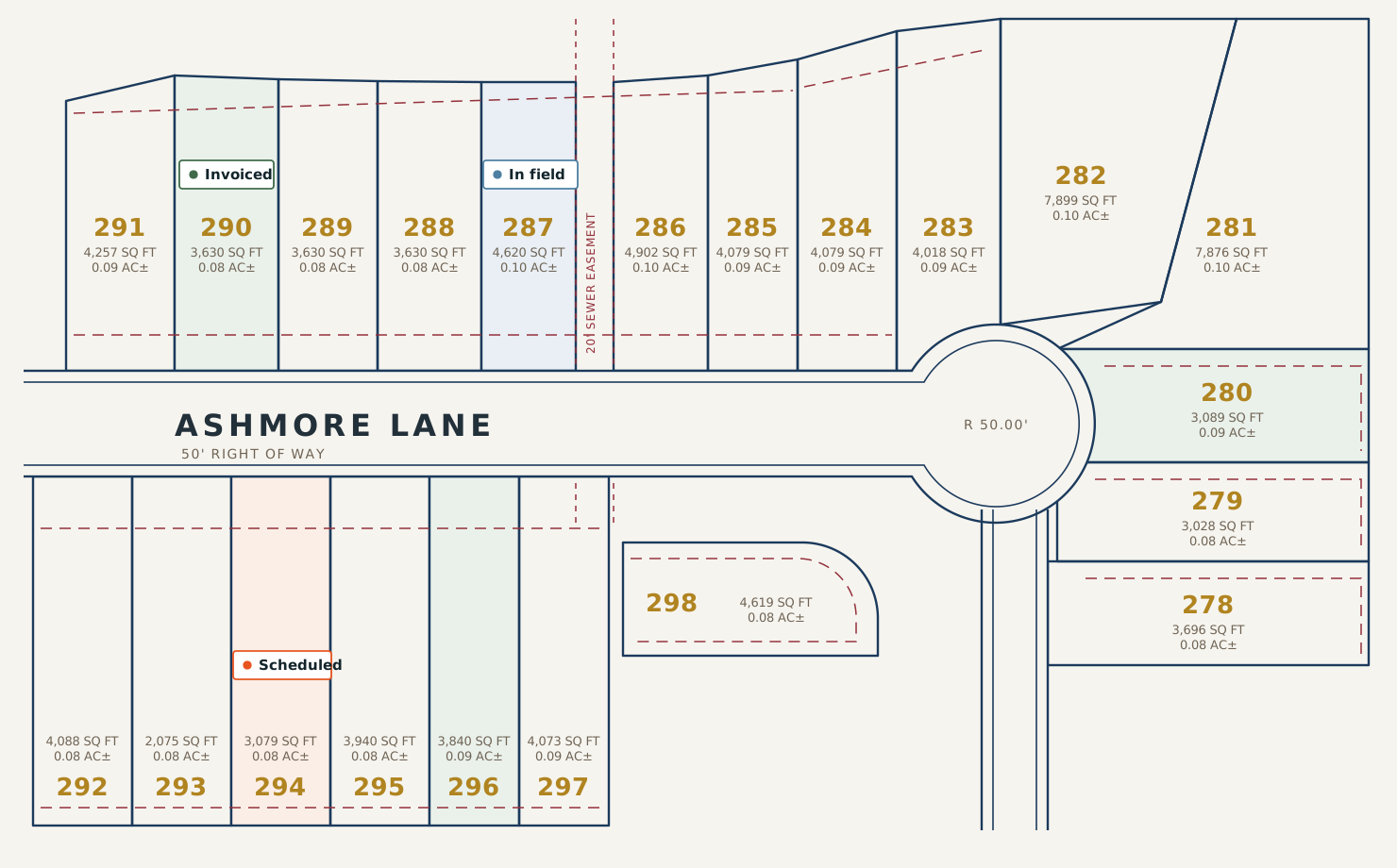
The records you already keep, in one place.
OMIS is organized around the way surveying work is actually filed: by builder, by subdivision, by lot. Not by ticket number.
Builders
Every builder you work for, with their contacts, billing details, and the subdivisions they are active in.
Subdivisions
Plat reference, phase, jurisdiction, and the services your firm provides in each one.
Lots
Lot and block, address, and every order ever placed against it, going back as far as your records do.
Orders
Service requested, dates requested and completed, crew assigned, current status, notes, and amount.
Order history
Every status change on every order, with who changed it and when. Nothing is overwritten.
Crews
Which field crew is assigned, what they have open, and what is waiting on them.
Invoicing
Invoice numbers carried on the order itself, so billing follows the work instead of chasing it.
Payments
Receipts recorded against orders and invoices, with method, reference, and running balance.
| Order | Lot | Builder | Service | Crew | Status |
|---|---|---|---|---|---|
| 48213 | 294 | Cardinal Homes | Foundation stakeout | Field Crew 2 | Scheduled |
| 48209 | 287 | Cardinal Homes | Final survey | Field Crew 1 | In the field |
| 48198 | 290 | Meridian Builders | Form board | Field Crew 3 | Invoiced |
| 48186 | 281 | Cardinal Homes | As-built | Field Crew 2 | Invoiced |
One order, start to finish.
The same path every job takes, whether it is a single stakeout or four hundred lots in a new phase.
The builder calls
Take the order against the lot it belongs to. The subdivision, builder, and address are already there, so you are entering the job, not re-entering the file.
Assign the crew
Put the order on a field crew and a date. The office and the field are looking at the same list.
The field updates it
Status moves as the work moves. Every change is recorded against the order, so nobody has to reconstruct what happened last Tuesday.
Invoice from the order
Billing pulls from completed work rather than from someone's memory, and the invoice number stays with the order.
Record the payment
Receipts apply against the invoice and the balance closes out. The lot keeps the whole history for the next time that builder calls about it.
Straight answers before you ask.
The things worth knowing early, stated plainly rather than buried.
What you get
- Every order filed on the lot it belongs to, not on a ticket number
- Last spring's stakeout one click from today's call about the same lot
- Finished work that has not been invoiced, flagged before the month closes
- Order status the office can answer without tracking down a crew chief
- Who ordered what, when, and at what price, when a builder remembers it differently
- Four visits to the same lot: stakeout, form board, final, as-built, all tracked in one record
What we do not do
- Make you re-enter the builder, subdivision, and address on every new order
- Bury last year's orders somewhere you have to ask us to retrieve them
- Leave unbilled work for you to find by reading back through field sheets
- Send the office to the field for an answer the record already holds
- Overwrite a status change, so nobody can show what it said before
- Split repeat visits to one lot into jobs that do not know about each other
Twenty years of the same work.
OMIS was written for a surveying firm that needed to stop losing orders on paper. It has been maintained continuously ever since, by the same people.
Common questions.
Answered directly, so you do not have to book a call to find out.
What is OMIS?
Who is OMIS built for?
Does OMIS replace our accounting system?
Can we get our data out if we leave?
Is there a contract, and how long is it?
Do you build custom features for individual firms?
Do you sell against a roadmap?
What happens if something in OMIS is broken?
How is OMIS priced?
Where is our data stored, and who can see it?
See it against your own subdivisions.
A walkthrough runs about forty minutes. Bring a plat and a builder you work for, and we will show you how the work would actually be filed.
- Live system, not a slide deck
- Your subdivision, your builder, your services
- Straight answers on pricing and terms
- No obligation and no follow-up sequence
Prefer to write directly?
info@omiscloud.com
·
980-288-4635
Request a demo
Tell us a little about your firm and we will come prepared.